Classifier
A classifier captures a group of values (either expressed explicitly or as a range) providing a title to each group.
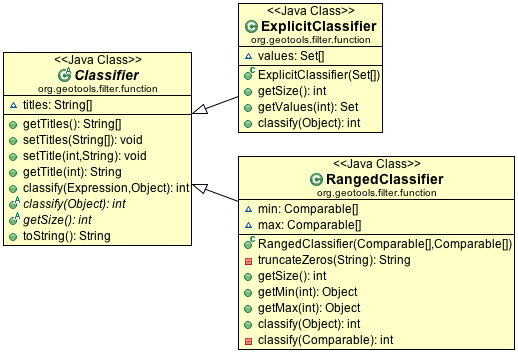
You can consider a Classifier as a set of groups into which you can sort your data:
ExplicitClassifier
Definition of explicit classifier by hand:
        Set[] zones = new Set[3];
        // urban commercial or residencial
        zones[0] = new HashSet(Arrays.asList(new String[] {
            "Zone 1", "Zone 2",
        }));
        // municipal or crown parkland
        zones[1] = new HashSet(Arrays.asList(new String[] {
            "Zone 4", "Crown 2",
        }));
        // industrial
        zones[2] = new HashSet(Arrays.asList(new String[] {"Zone 3"}));

        Classifier landuse = new ExplicitClassifier(zones);
        landuse.setTitle(0, "urban");
        landuse.setTitle(1, "park");
        landuse.setTitle(2, "industrial");
RangedClassifier
Definition of a ranged classifier by hand:
        Comparable[] min = new Comparable[25];
        Comparable[] max = new Comparable[25];
        for (int i = 0; i < 25; i++) {
            min[i] = (char) ('A' + i);
            max[i] = (char) ('B' + i);
        }
        Classifier alphabetical = new RangedClassifier(min, max);
As shown above each group can be provided with a title; these titles will be used in the generated styles:
        groups.setTitle(0, "Group A");
        groups.setTitle(1, "Group B");
You can also automatically generate a Classifier from a FeatureCollection.
The following “classifier” functions are available:
EqualInterval - classifier where each group represents the same sized range
Jenks - generate the Jenks’ Natural Breaks classification
Quantile - classifier with an even number of items in each group
StandardDeviation - generated using the standard deviation method
UniqueInterval - variation of EqualInterval that takes into account unique values
Here is the code example with quantile:
        FilterFactory ff = CommonFactoryFinder.getFilterFactory();
        Function classify = ff.function("Quantile", ff.property("name"), ff.literal(2));

        Classifier groups = (Classifier) classify.evaluate(collection);
Example using EqualInterval to break down a continuous range of values (such as height):
        FilterFactory ff = CommonFactoryFinder.getFilterFactory();
        Function classify = ff.function("EqualInterval", ff.property("height"), ff.literal(5));

        // this will create a nice smooth series of intervals suitable for presentation
        // with:
        // - sequential color palette to make each height blend smoothly into the next
        // - diverging color palettes if you want to make higher and lower areas stand out more
        Classifier height = (Classifier) classify.evaluate(collection);
Example using Quantile to break up a list of items (such as zones):
        FilterFactory ff = CommonFactoryFinder.getFilterFactory();
        Function classify = ff.function("Quantile", ff.property("zone"), ff.literal(2));

        // Zones assigned by a municipal board do not have an intrinsic numerical
        // meaning making them suitable for display using:
        // - qualitative palette where each zone would have the same visual impact
        Classifier groups = (Classifier) classify.evaluate(collection);